

OG Image Check Tool

Preview Your Link

Before It's Shared

The OG Facebook Image is an easy cheat code for your business. Great leads come from direct referrals, control how your page shows up when you friends and fans share your page anywhere on the internet.

Paste Your Link Below

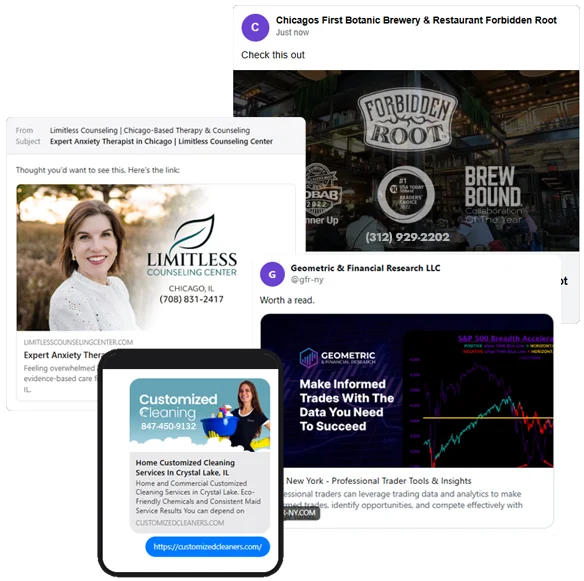
Social share image examples

OG Image Social Share Preview Tool

Paste in any page URL and see exactly how it shows up when someone shares it on Facebook, X, LinkedIn, in a text, or inside an email. If the image or title looks wrong here, it looks wrong to everyone who shares your link.

Tip: check a blog post, a product page, or your homepage. Press Enter to run it.
Just now
Check this out
Worth a read.
Promoted
Sharing this with my network.

What we found in your tags

Why Your Link Looks Bad When People Share It

When someone pastes your link into Facebook, a text message, or an email, the platform doesn't read your whole page. It reads a handful of hidden tags in your code called Open Graph tags. Those tags decide the image, the headline, and the blurb that show up in the preview.

Get them right and your link looks like a real, clickable thing. Get them wrong and you get a blank gray box, a stretched logo, or the wrong headline. People scroll right past it. This tool pulls those tags from any page so you can see the preview before you hit share.

The Tags That Matter

og:title The headline of the preview. Keep it under about 60 characters so it doesn't get cut off. If this is missing, platforms fall back to your page title, which is often not what you want.
og:description The blurb under the headline. Two short sentences is plenty. Write it for a human deciding whether to click, not for a search engine.
og:image The picture. This is the one people notice. Use 1200 by 630 pixels. Anything smaller can show up cropped or as a tiny thumbnail instead of the big card.
og:url The clean link the share points to. Keeps tracking junk out of the shared URL and tells platforms which page is the real one.
twitter:card Controls the X layout. Set it to summary_large_image for the big image card. Without it, X may show a small square thumbnail or nothing at all.

Quick Fixes That Make a Difference

Always set an image. A link with no image gets a fraction of the clicks. One good 1200 by 630 image is the single biggest win here.
Use a full image URL. The image path needs to start with https, not a relative path like /images/photo.jpg. Relative paths often break in previews.
Write the title for the share, not for Google. The preview headline can be punchier than your SEO title. Make someone want to click.
Re-scrape after changes. Facebook and LinkedIn cache old previews. After you fix your tags, run the link through Facebook's Sharing Debugger and LinkedIn's Post Inspector to force a refresh.